
Photo organizer.
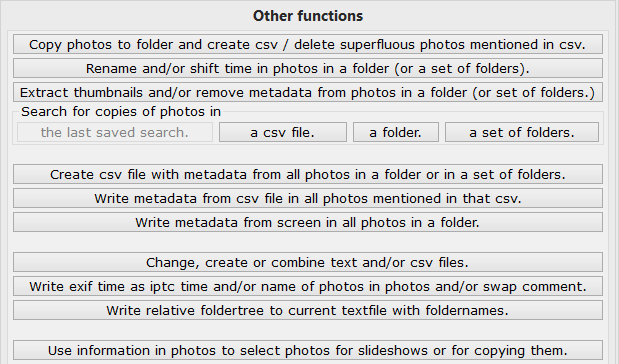
Write exif time as iptc time and/or name of photos in photos and/or swap comment and caption.

Nederlandse site.
|
Photo organizer.Write exif time as iptc time and/or name of photos in photos and/or swap comment and caption. |
Nederlandse site. |
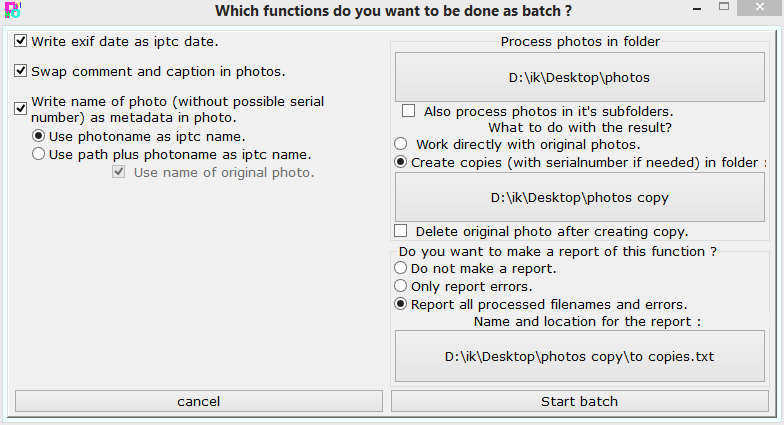 Here you can choose up to three functions which you can perform simultaneously on all photos in a folder, with or without it's subfolders.
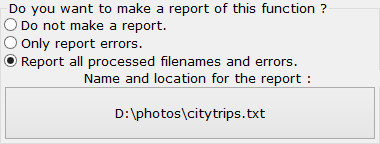 Here you can choose to create a textfile in which all the activity is reported. Three options: not writing any report, report only errors or report all
processed filenames and errors. If you choose a textfile which already exists, the report will be added at the end of that textfile.
Here you can choose to create a textfile in which all the activity is reported. Three options: not writing any report, report only errors or report all
processed filenames and errors. If you choose a textfile which already exists, the report will be added at the end of that textfile.
 With these buttons you return to the mainscreen without doing anything or you start the activity as you have defined with your choices in the rest of this dialogbox.
 After pressing the Start batch button you get this window in which you can see what Photo organizer is doing. You can stop this process by pressing the
button or you can shutdown the computer after this process is done by checking the checkbox. In that case, make sure that there are no other programs active
which require your attention, otherwise those programs may prevent the shutdown of the computer.
After pressing the Start batch button you get this window in which you can see what Photo organizer is doing. You can stop this process by pressing the
button or you can shutdown the computer after this process is done by checking the checkbox. In that case, make sure that there are no other programs active
which require your attention, otherwise those programs may prevent the shutdown of the computer.
 After the job is done the program waits for you to click on the button with which you return to the main window.
| Hans van der Hoeven Liesbospark 28 4813 HV Breda The Netherlands |
Program explanation FAQ |
home Contactform Get a key |
mail:info@photoorganizer.nl © 2015, Hans van der Hoeven URL: www.photoorganizer.nl |
| © HHdesign. | Webmaster: HHdesign. |